CRM Implementation Plan: Step-by-Step Guide & Best Practices for a Smooth Rollout
Implementing a new CRM system is a pivotal step for growing businesses. A thoughtful CRM implementation plan ensures your organization adopts the platform efficiently-minimizing downtime, maximizing user adoption, and driving ROI. Whether you’re migrating from legacy systems or launching CRM for the first time, planning every stage reduces risk and speeds time-to-value.
In this post, we’ll walk you through a structured CRM implementation plan, highlight common pitfalls, and offer concrete tactics to anchor your execution. From kickoff to post-launch training and optimization-this guide helps you move confidently from planning to impact.
What Is a CRM Implementation Plan?
A CRM implementation plan is a documented roadmap that outlines every phase of deployment, from the initial project kickoff to post-launch training and ongoing optimization. It ensures alignment across departments such as marketing, sales, support, and IT, offering clarity on individual responsibilities, timelines, and deliverables.
With a structured plan, businesses can anticipate and navigate technical and organizational challenges. Benefits include improved coordination, reduced risk of operational disruption, increased adoption rates due to phased training, and measurable success metrics that align with broader business goals. This level of planning not only improves team efficiency but also enhances the customer experience through seamless service and data access.
Core Building Blocks of a CRM Implementation Plan
A successful CRM implementation is composed of several critical building blocks, each supporting the overall structure of your deployment.
Start with a project kickoff that includes defining objectives, assigning leadership roles, and setting project milestones. Establish KPIs early on-for example, tracking improvements in sales cycle duration or customer response time-to maintain focus on outcomes.
Next, requirements gathering and process mapping are essential. These steps identify how your teams operate and what functionalities they need. Interviews and workshops can uncover hidden inefficiencies or opportunities for automation. This documentation phase is where the CRM begins to take shape according to your company’s workflows.
The third building block is data preparation. Cleanse your data thoroughly to avoid cluttering your CRM with duplicates or obsolete information. Plan your migration meticulously, using staging environments for test runs and engaging technical leads to ensure secure and accurate transfer.
System configuration is the fourth element. Customize dashboards, pipelines, and automations based on your mapped workflows. Ensure compatibility with adjacent platforms like email tools, accounting software, or help desks to create a cohesive tech stack.
Lastly, build a training and support system. Organize role-specific onboarding, offer resources like FAQs and walkthroughs, and appoint internal champions who can support their peers post-launch. These support structures make a massive difference in ensuring team-wide adoption and sustained usage.
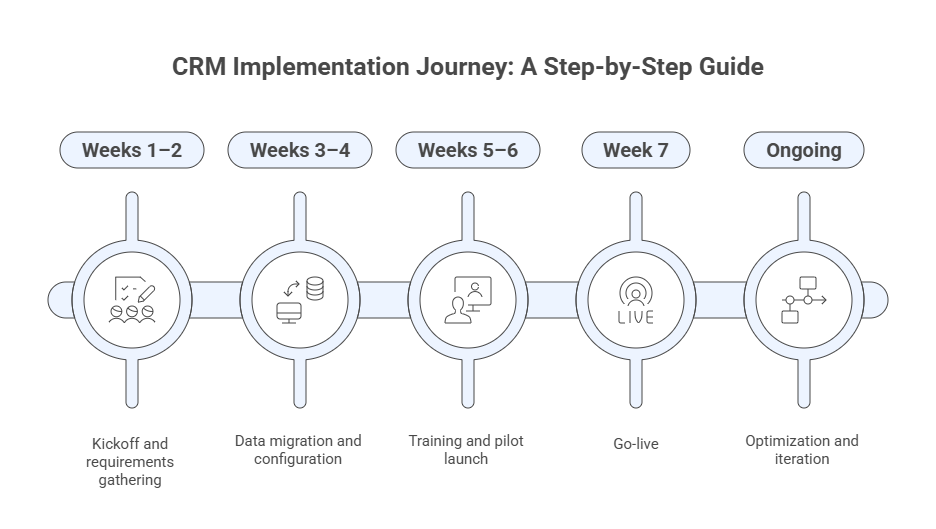
CRM implementation journey visual timeline: kickoff, data migration, training,
 go-live, and continuous optimization phases for successful CRM deployment
Step-by-Step CRM Implementation Plan Walkthrough
Kickoff & Alignment
Start by aligning stakeholders around shared goals. Define what success looks like through measurable KPIs such as reduced sales cycles or increased lead conversions. Assign roles and create a project charter to formalize timelines and deliverables. A steering committee can guide strategic decisions and risk management.
Process Mapping & Requirements
Engage teams through interviews and workshops to document current workflows and pain points. Translate these into functional CRM requirements, ensuring every department’s voice is heard. This will make the system intuitive and relevant, enhancing long-term adoption. Consider using process mapping tools like Lucidchart or Miro for collaborative visualization.
Data Strategy & Migration
Start with a full audit of existing data. Clean duplicates, standardize field formats, and resolve inconsistencies. Use a sandbox environment to test field mapping and data integrity. Always backup legacy data before the final transfer to safeguard against loss. Data governance policies should be established early to avoid future compliance issues.
Configuration & Integration
Customize the CRM by setting up relevant modules-leads, contacts, opportunities, support tickets-based on your mapped processes. Automate repetitive tasks and integrate with existing tools like email marketing platforms or ERP systems. Ensure that the system reflects day-to-day operations to maximize value. It’s wise to create a system documentation file to capture configurations for future audits or vendor transitions.
Training & Change Management
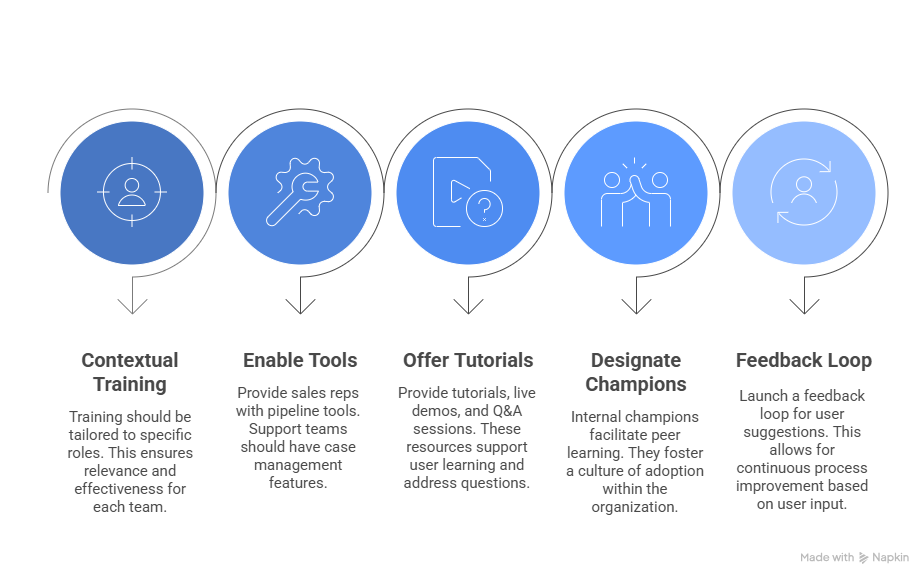
    CRM user adoption strategies: contextual training, enabling tools, offering tutorials,
      designating champions, and creating feedback loops for successful CRM rollout.
Pilot Launch
Deploy the system with a small user group to identify usability issues and gather real-world feedback. Refine workflows, fix bugs, and adjust dashboards as needed. A successful pilot can mitigate broader rollout risks. Ensure your helpdesk is fully staffed to support the pilot group during the transition.
Full Go-Live
After refining through the pilot, launch across all departments. Offer real-time support through help desks or chat tools. Track initial usage metrics like login frequency and CRM-generated deals. Celebrate milestones to encourage ongoing engagement. Company-wide announcements and leadership support can help reinforce the importance of adoption.
Optimization & Continuous Improvement
Monitor usage data, adoption trends, and business outcomes. Use quarterly reviews to gather user feedback, assess ROI, and refine automations or reporting. CRM is not a static tool-it should evolve with your business needs. Encourage users to adopt new features and participate in advanced training modules.
Common Pitfalls & How to Avoid Them
Many CRM implementations fail due to poor planning or lack of buy-in. One of the biggest mistakes is skipping stakeholder input, which leads to misaligned features and poor adoption. Likewise, migrating poor-quality data results in a system no one trusts.
Over-customization can create long-term maintenance challenges and increase dependency on consultants. Aim for a balanced approach where you leverage out-of-the-box features and only customize when truly necessary. Finally, a lack of training or change management support can derail adoption. Proactive planning and continuous engagement are key to long-term success.
In addition, organizations often neglect the post-launch optimization phase, assuming the project is complete once the CRM is live. In reality, this is where long-term value is created. Creating a roadmap for incremental improvements and staying engaged with vendor updates ensures sustained success.
CRM Implementation Plan Templates & Tools
Templates can save time and help standardize the planning process. Tools like Asana, Monday.com, or Smartsheet provide Gantt charts and task trackers for managing each phase of the rollout. CRM vendors often offer starter checklists and sample workflows tailored to their platforms. These resources can guide your team through project milestones and simplify cross-functional collaboration.
You may also want to create internal dashboards to track adoption metrics like login rates, data accuracy, and sales performance tied to CRM usage. Consider integrating these dashboards with BI tools like Tableau or Power BI for deeper insights. Having a centralized reporting hub can also keep executives aligned with frontline outcomes.
Conclusion
A well-structured CRM implementation plan is essential for a successful rollout. By aligning stakeholders early, cleaning and mapping data correctly, delivering role-based training, piloting before full launch, and iterating continuously, you give your organization the best chance to maximize CRM ROI and adoption.
Take actionable steps today: assemble your project team, define goals and timelines, and start mapping your key workflows. With a clear implementation plan in place, you’re ready to move forward and transform how your business engages with leads and customers. Continuous review and adaptation will keep your CRM strategy aligned with evolving market and internal needs.
FAQ
Q: How long does a CRM implementation plan typically take?
A: Most small to mid-sized businesses complete planning, pilot, and go-live in 6 to 8 weeks, though full optimization may span a few months.
Q: Should we involve employees across all departments or just sales/marketing?
A: You should involve all departments that interact with customers: sales, marketing, support, finance, and even operations to capture end-to-end processes and reduce silos.
Q: What metrics should we track after implementation?
A: Data accuracy, user login/adoption rate, conversion and response times, sales cycle length, and customer satisfaction or ticket resolution times.
Q: Is it better to customize CRM heavily or use primarily out-of-the-box features?
A: Aim to use native features first-start simple and customize only where necessary. Over-customization complicates future upgrades.
Q: Can we implement CRM without professional services?
A: If you have strong internal project management, data resources, and technical ability, you can. But many companies benefit from expert partners for faster and smoother execution.
Like what you see? Share with a friend.
Itay Guttman
Co-founder & CEO at Engini.io
With 11 years in SaaS, I've built MillionVerifier and SAAS First. Passionate about SaaS, data, and AI. Let's connect if you share the same drive for success!
Share with your community


.png)
Comments