Task Automation: The Complete Guide to Streamlining Workflows in 2025 and Beyond
In an era where time is the most valuable resource, finding ways to reduce manual effort has become critical. As a result, professionals and businesses are searching for solutions that save time and eliminate repeated work. This is where task automation steps in. For example, instead of doing every task manually, automation leverages technology – especially AI and workflow tools – to execute tasks with little to no human intervention.
As of 2025, task automation has evolved far beyond simple scripts or macros. From AI-powered scheduling assistants to large business process automation, automation is changing how individuals and organizations operate. This guide will explain what task automation is, why it matters, which tools to use, and how to start automating effectively.
What is Task Automation?
Task automation is the use of software, AI, or digital tools to complete routine or repeated tasks without the need of constant human input. In practice, rather than sending reminders, copying data, or creating reports manually, automation performs these actions instantly and accurately.
Automation can be as simple as setting up email filters that organize your inbox, or as advanced as creating AI-powered workflows that analyze data, generate insights, and trigger next steps in real time. At its core, task automation removes extra manual effort and allows humans to focus on important, creative, or strategic work.
Why Task Automation Matters in 2025
Workplaces have never been more complex. Teams work together across continents, tools are more linked, and amount of work continue to grow. Meanwhile, the rise of artificial intelligence and low-code platforms has made automation more accessible than ever.
Consider this: employees spend an average of 3–4 hours per day on repetitive tasks like emails, scheduling, and reporting. That’s nearly half the workday consumed by tasks that could be automated. Therefore, task automation helps reclaim this time, leading to:
- – Increased productivity: Workers focus on impactful tasks instead of repeated chores.
- – Fewer errors: Automated workflows reduce mistakes caused by manual data entry or oversight.
- – Scalability: Businesses can handle more work without increasing headcount.
- – Improved employee satisfaction: People spend more time on meaningful work and less on “busy work.”
For individuals, automation translates into less stress and more free time. For organizations, it creates a competitive edge in efficiency and innovation.
Core Strategies for Task Automation
Automation can feel overwhelming at first, but breaking it down into strategies makes it easier to apply. In 2025, these approaches are the most effective for streamlining workflows.
1. Identify Repeated Tasks
Automation begins with spotting patterns. Ask yourself: What tasks do I repeat daily, weekly, or monthly? Examples include planning meetings, sending reminders, generating invoices, or transferring data between systems. Listing these tasks reveals the prime candidates for automation.
2. Start Small, Scale Fast
One of the most common mistakes is trying to automate everything at once. A better approach is to start with one or two high-frequency tasks. For instance, set up an automated email response for common customer queries or create a recurring task reminder in a project management tool. Once these are working smoothly, expand automation to more complex workflows.
3. Integrate Your Tools
Disconnected apps create silos and inefficiencies. Tools like Zapier, Make, and Engini connect systems together so that when something happens in one app, it automatically triggers an action in another. Example: when a lead fills out a form on your website, automation can instantly add them to your CRM, notify the sales team, and send a personalized welcome email.
4. Use AI for Intelligent Automation
AI takes automation to the next level by not just executing tasks but also making decisions. Microsoft Copilot integrates with Office tools to draft emails, summarize meetings, and generate presentations. Notion AI can analyze notes and create action items automatically. Motion uses AI to rearrange your schedule in real time when priorities shift. These tools provide not just efficiency but also adaptability.
5. Automate Personal Productivity
Automation isn’t only for businesses. Individuals can benefit too. Calendar apps can automatically schedule meetings around your availability. Smart assistants like Alexa and Google Assistant can set reminders and control connected devices with voice commands. Personal finance apps can automate budgeting, savings transfers, and bill payments. The result is more mental space for important decisions and creative pursuits.
Real-World Example: How One Freelancer Automated 10 Hours of Work Weekly
To show how task automation works in the real world, let’s look at Mia, a freelance designer juggling multiple clients. Every week, she spent hours manually sending invoices, updating project boards, and confirming meeting times.
In 2025, Mia decided to automate:
- – Client onboarding: A Typeform intake form linked to Notion created a new client dashboard automatically.
- – Weekly invoicing: QuickBooks auto-generated invoices every Friday and emailed them using an Engini‘s trigger.
- – Meeting scheduling: Calendly synced with her calendar and auto-sent reminders via Gmail.
Result? Mia saved 10+ hours per week-time she now spends building client relationships and refining her craft.
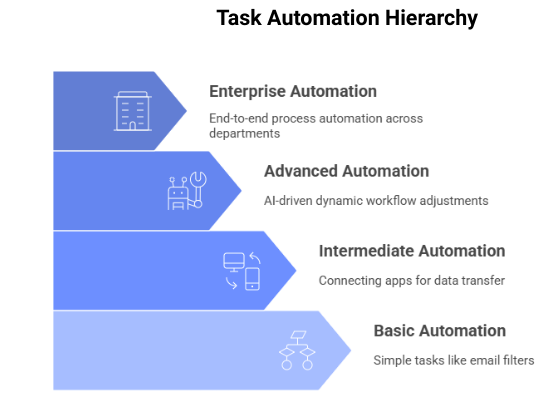
The four levels of task automation, from simple email filters to enterprise-wide process automation
The Role of AI in Task Automation
AI is the driving force behind next-generation automation. Unlike traditional scripts or rules, AI-powered automation can learn, adapt, and predict outcomes. Here are some real-world examples in 2025:
- – Microsoft Copilot: Integrated into Outlook and Teams, it automatically drafts responses, prioritizes emails, and creates meeting summaries.
- – Motion: Uses AI to schedule tasks, automatically rearranging your calendar based on deadlines and unexpected events.
- – Notion AI: Converts raw meeting notes into structured action plans and creates summaries that keep teams aligned.
- – Trello & Asana AI Features: These tools now flag potential project bottlenecks before they happen, helping managers reassign tasks proactively.
These tools demonstrate how AI doesn’t just “do tasks” – it actively manages workflows and enhances decision-making, creating a seamless collaboration between humans and technology.
Common Mistakes in Task Automation
While automation is powerful, it’s easy to fall into traps. One mistake is over-automating tasks that don’t add real value, creating unnecessary complexity. Another is failing to monitor automated workflows, which can result in errors going unnoticed for too long. Some people also rely too heavily on automation, neglecting the need for human oversight in sensitive areas like customer service or financial approvals.
The best practice is balance: automate repetitive, rules-based tasks while keeping human judgment for nuanced, relationship-driven work.
Conclusion: The Future of Work is Automated
Task automation is no longer a futuristic concept – it’s the present reality of how professionals and organizations thrive in 2025. By removing repetitive work, automation empowers people to spend more time on innovation, problem-solving, and meaningful contributions.
The key is to start small, choose the right tools, and continuously refine. Over time, you’ll build an ecosystem where automation handles the busywork, and you focus on the big picture.
Automation isn’t about replacing people – it’s about unlocking human potential by letting technology handle the tasks that don’t require creativity or empathy.
FAQ: Task Automation
Q1. What is task automation?
Task automation is the use of software or AI tools to complete repetitive tasks with little or no human involvement, saving time and reducing errors.
Q2. Can small businesses benefit from task automation?
Absolutely. Automation helps small teams scale without additional staff by handling planning, invoicing, customer support, and more.
Q3. How is AI different from traditional automation?
Traditional automation follows fixed rules, while AI-driven automation adapts, learns, and makes predictions to improve efficiency.
Q4. What are easy tasks to automate at home?
Examples include bill payments, calendar scheduling, grocery reordering, and smart home routines like lighting and thermostat control.
Q5. What’s the biggest benefit of task automation?
Time. Automation frees up hours every week, allowing individuals and teams to focus on higher-value, creative, or strategic work.
Like what you see? Share with a friend.
Itay Guttman
Co-founder & CEO at Engini.io
With 11 years in SaaS, I've built MillionVerifier and SAAS First. Passionate about SaaS, data, and AI. Let's connect if you share the same drive for success!
Share with your community


.png)
Comments