Productivity Tools
September 2, 2025
Workflow Automation Platform: The 2025 Buyer’s Guide to Choosing, Implementing, and Proving ROI
If your teams spend hours every week moving data between tools, updating sheets, and nudging tasks across systems, you’ve already felt the pain a workflow automation platform can remove. These platforms orchestrate people, data, and SaaS apps so the right work happens automatically, consistently, and safely. With AI copilots and no‑code builders now common, the question isn’t whether to automate, but how to choose the platform that fits your stack, controls requirements, and growth plans.
This guide takes a practical, buyers view. We’ll explain what a workflow automation platform really is (and isn’t), how it differs from iPaaS, BPM, and RPA, what features matter, how to estimate ROI, and a step by step rollout plan you can use next quarter.
What Is a Workflow Automation Platform And How It Differs From iPaaS, BPM, and RPA
A workflow automation platform is software that lets you design, execute, and monitor end-to-end business workflows across multiple systems. Think of it as the digital connector coordinating APIs, human approvals, and data changes so work moves from trigger to outcome without manual handovers. Modern platforms mix no-code visual builders for speed with developer extensibility for custom logic and scale.
How does this category relate to nearby abbreviations?
- – iPaaS (integration platform as a service) focuses on connecting apps and moving data without errors. Some iPaaS tools include basic flows, but they often stop at data sync. A true workflow automation platform adds conditional logic, human reviews, service targets, retries, branching, and operational monitoring across multi step processes.
- – BPM (business process management) emphasizes modeling and controls for complex, often regulated processes. Classic BPM suites can be heavy to roll out. Modern workflow platforms borrow BPM discipline-versioning, audit trails-without the bloat.
- – RPA (robotic process automation) automates tasks at the UI level, typically for legacy systems without APIs. RPA is powerful but fragile when interfaces change. A workflow automation platform favors API-first orchestration, dropping into RPA only where needed.
If your primary pain is coordinating multi app processes with people in the loop, an API-first workflow automation platform is usually the best fit.
Signs You’re Ready for a Workflow Automation Platform
Organizations typically adopt automation in waves. You’re ready when the cost of manual coordination exceeds the cost of change. Common signals include:
- Handoffs are breaking SLAs. Tickets, quotes, or onboarding tasks sit idle because someone missed a notification or a field wasn’t updated in a second system.
- Shadow sheets are running the business. If “the real status” lives in a private sheet, expect data quality and compliance issues.
- Your stack has multiplied. Each team added specialized SaaS, but cross tool processes didn’t keep up.
- Rework is normal. Human copy paste creates mismatches that ripple downstream to billing, analytics, and customer experience.
- Engineering is the bottleneck. Product and data teams want automation, but dev cycles are reserved for core roadmap.
A dedicated platform gives you speed, guardrails, and monitoring & visibility without recruiting a squad of engineers.
Workflow Automation Platform Features
With that in mind, here’s what to look for. Use this list to judge platforms by outcomes, reliability, and controls not marketing copy.
-
– Visual, modular builder – Drag and drop with reusable steps, typed inputs/outputs, versioning, and inline tests so you ship safely.
-
– Rich triggers & events – Webhooks, event streams bus, CDC, and SaaS event hooks so flows are event based (not polling).
-
– Human in the loop – Native approvals, clear assignments, SLAs/escalations, and auditable rationale for exceptions.
-
– Data transform & enrichment – Map/validate/normalize with expressions or SQL/JSONata; warehouse/CDP lookups; PII masking.
-
– AI assistance (with guardrails) – Generate steps; extract/summarize/classify with confidence thresholds, structured outputs, and rule-based fallbacks.
-
– Error handling & duplicate-safe actions – Retries with backoff, dead letter queues, and deduplication to avoid duplicates and recover cleanly.
-
– Observability & ops – Live runs, easy to search logs, distributed tracing, and metrics (success rate, duration, queue depth) for fast diagnosis.
-
– Security, privacy & governance – SOC 2/ISO, SSO/SAML, detailed roles RBAC, secrets management, env isolation; data location + field level encryption as needed.
-
– Extensibility for engineers – Custom code steps, SDKs, serverless functions so you extend without rebuilding the world.
-
– Connectors that actually work – Deep, well maintained connectors for your core stack with pagination, rate limit handling, and change safe updates.
How to Evaluate a Workflow Automation Platform
You don’t need a 200 row sheet to pick a winner; focus on what changes outcomes in your context. Here’s a concise scorecard to help you compare a workflow automation platform shortlist:
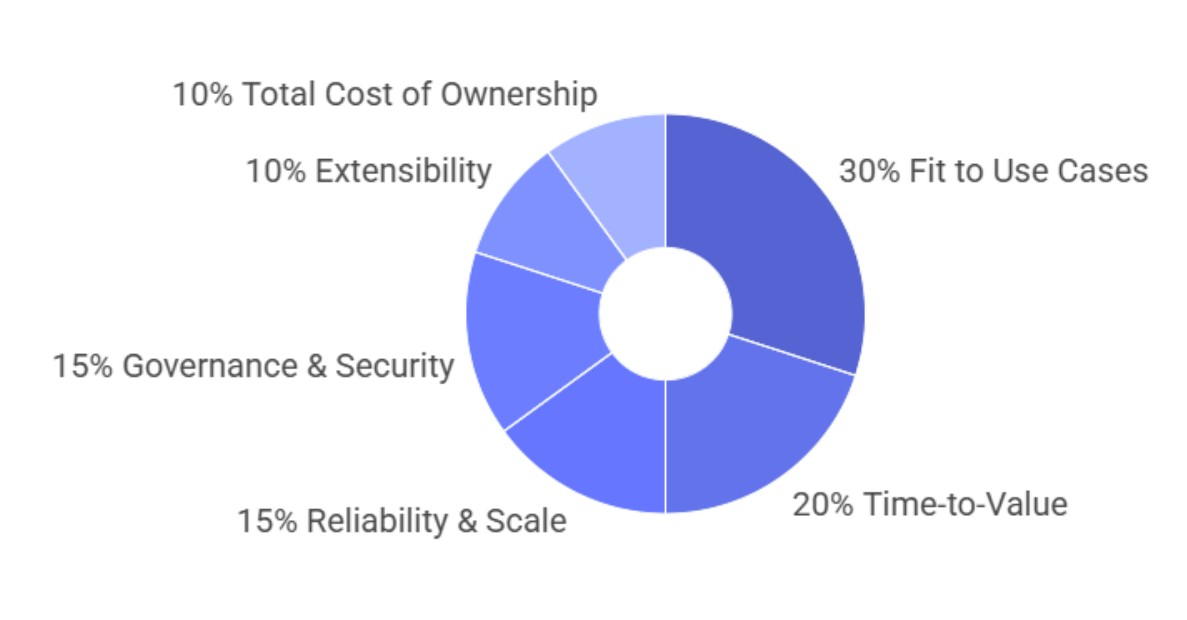
- – Fit to Use Cases (30%): Can it model your real branching, approvals, exceptions without hacks?
- – Time-to-Value (20%): How quickly can a non technical user ship a production flow with checks?
- – Reliability & Scale (15%): service targets, run-in-parallel controls, no-duplicate actions, retries, and run history.
- – Governance & Security (15%): SOC 2/ISO, SSO/SAML, RBAC, audit logs, data location, key management.
- – Extensibility (10%): SDKs, custom code steps, event bus hooks, serverless.
- – Total Cost of Ownership (10%): Pricing transparency, connector limits, overage policies, ops overhead.
Run a 2 week pilot with 2–3 high value workflows and score vendors against these dimensions using production like data.
Workflow Automation Platform Security & Governance
Automation touches sensitive data and decisions. Your legal and security teams will ask incisive questions and they should. Prepare answers across three axes:
Identity & Access: Enforce SSO/SAML, MFA, and least privilege RBAC. Require environment isolation so experiments don’t impact production. Support service accounts for CI/CD and machine to machine auth.
Data Protection: Encrypt data at rest and in transit. Minimize data movement (process in place when possible), mask PII in logs, and enable data retention policies. If you operate in multiple regions, confirm data location and lawful transfer options.
Operations & Auditability: Maintain complete run histories, approval decisions, and configuration diffs. Look for evidence of independent audits (SOC 2 Type II, ISO 27001), incident response maturity, and clear shared responsibility boundaries.
Good governance isn’t bureaucracy it’s how you scale automation without regret.
90 Day Workflow Automation Platform Rollout
Ambitious automation programs stall when they try to “boil the ocean.” Use a narrow but valuable rollout to build momentum.
Days 0–15: Discovery & Design
Interview process owners in RevOps, Finance, Support, and IT. Map the “happy path” and the messy edge cases. Document triggers, systems, data, approvals, and service targets. Choose 2–3 workflows with high value and clear boundaries (e.g., lead to opportunity, employee onboarding, invoice exception handling).
Days 15–45: Pilot & Governance Baseline
Set up SSO/SAML, RBAC, secrets, and environments. Build the pilot workflows in the visual builder; add tests and synthetic data. Incorporate human in the loop approvals with service targets and escalation. Enable observability logs, alerts, and dashboards. Run a security review.
Days 45–75: Production & Training
Move pilots to production with change management. Train “citizen builders” on conventions: naming, error handling, and how to request connectors or code steps. Publish a catalog of approved steps and templates so teams don’t reinvent the wheel.
Days 75–90: Expand & Measure
Add 3–5 more workflows, focusing on reusability. Start a monthly automation council: review metrics, prioritize backlog, and approve architectural patterns. Record before and after metrics to feed your ROI dashboard.
Workflow Automation Platform Use Cases by Team
Revenue Operations: Route leads by ICP fit; enrich with firmographic data; create and assign opportunities; notify AEs; spin up follow-up sequences; and kick off agreements on “Closed Won.” Result: faster speed to lead, less leakage, cleaner CRM data.
Customer Success & Support: Detect churn signals (low product usage + negative NPS), open proactive playbooks, and schedule success plans. Auto triage tickets by intent and sentiment; escalate VIPs; and summarize context for agents with AI.
Finance & Billing: Automate quote to cash: validate pricing rules, generate invoices, sync to the ledger, and flag anomalies for review. Route payment failures to dunning workflows with personalized comms.
People Ops: Pre-boarding to provisioning: collect docs, trigger background checks, create accounts in IdP and SaaS tools, schedule onboarding sessions, and assign checklists to managers.
Data & Analytics: Ingest events, standardize schemas, backfill late arriving data, and notify owners when metrics deviate. Trigger experiments or cohort refreshes when conditions change.
Across these, the platform’s superpower is consistent execution with clear ownership and monitoring & visibility.
Measuring Impact and Avoiding Common Pitfalls
Successful programs make impact visible and mistakes survivable. Set baseline metrics before you go live cycle time, error rate, time-to-first-response, hours spent and track deltas in a shared dashboard.
Common pitfalls (and how to avoid them):
- – Automating a broken process. Fix the process first, automation amplifies whatever exists.
- – No change management. Communicate roles and failure modes, publish an “automation catalog” so teams know what runs where.
- – Under-investing in error handling. Build retries, compensations, and alerts from day one.
- – Too many citizen builders, not enough guardrails. Establish design patterns, reviews, and RBAC to keep quality high.
- – Ignoring documentation. Treat workflows like code: version, describe, and link to owners.
FAQs
What is the best workflow automation platform?
It depends on your use case: Zapier (fast no-code, app coverage),
Make (visual builder & templates), n8n (self hosted & extensible),
Microsoft Power Automate/Copilot (Microsoft centric),
and IBM (enterprise orchestration).
What is a workflow automation system?
Software that designs, executes, and monitors multi-step processes across apps and teams
using triggers, rules, and integrations often with AI to route and enrich work.
Is Zapier a workflow automation tool?
Yes-Zapier connects thousands of apps and now offers AI-assisted multistep workflows and agents.
Which platform is best for automation?
By scenario: marketing/sales ops (Zapier, Make); security sensitive or embedded (n8n);
Microsoft shops (Power Automate/Copilot); complex enterprise workflows (IBM).
What’s the difference between workflow automation and iPaaS/BPM/RPA?
iPaaS moves data; BPM governs processes; RPA automates UIs;
a workflow platform coordinates people, data, and systems and can incorporate the others.
How long does it take to see value?
With a focused pilot (2–3 workflows), most teams see measurable time savings in 30–60 days and broader ROI by 90 days.
Conclusion
A workflow automation platform is no longer a nice to have. It’s the connective tissue that keeps your GTM, finance, people, and product operations moving in sync accurately and on time. As you evaluate, focus less on pamphlet and more on your real processes: triggers, data, approvals, service targets, and error handling. Run a focused 90 day rollout, prove ROI on a handful of high value workflows, and expand from there with governance and monitoring & visibility baked in.
If you’re ready to see what a modern platform looks like, explore a guided demo, bring a candidate workflow, and time how long it takes to go from whiteboard to production. That stopwatch and the before and after metrics will tell you everything you need to know.
Like what you see? Share with a friend.


.png)
Comments