Welcome to the Engini pricing parameters guide. This guide outlines the features associated with each of our packages to help you choose the plan that best suits your needs.
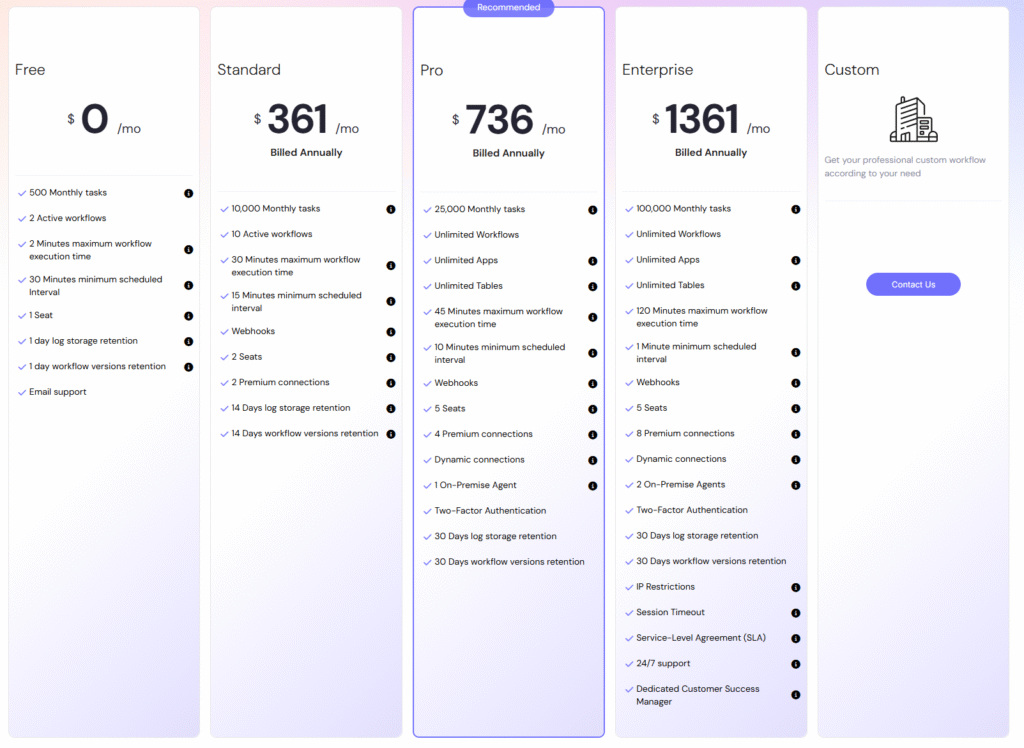
Each of the pricing plans comprises a varying number of parameters, and we will provide a brief overview of each:
Workflows #
The number of distinct automated workflows you can create. Workflows define the sequence of actions, triggers, and conditions that govern your automated processes.
For more detailed information about workflows in Engini, please refer to our Workflows guide.
Apps #
The number of applications you can build with Engini, each with an unlimited number of screens.
For more detailed information about apps in Engini, please refer to our AppMaker guide.
Tables #
The number of data tables available for your automated processes. Tables store and organize data, facilitating efficient data management within your workflows and apps.
For more detailed information about tables in Engini, please refer to our Tables guide.
Files Column (Tables & Apps) #
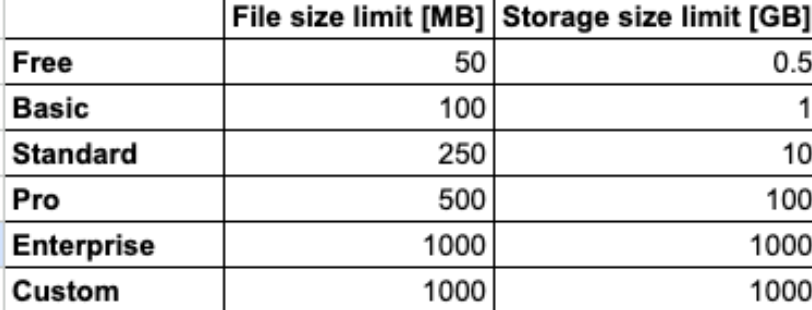
The Files column can store different file sizes, and the maximum storage limit depends on your account. As shown in the following picture:
For more detailed information about files column, please click here
Schedule execution interval #
The minimum time interval between scheduled triggers. This parameter determines how frequently your automated workflows can be initiated on a scheduled basis.
Activities #
The total number of actions within your automated workflows. Each activity represents a specific task or operation carried out as part of your automation.
For example, A workflow consisting of 4 activities:
When this workflow runs, Engini counts each of these 4 activities towards your total activity count for the selected pricing plan. Each action within your workflows, whether it’s triggering an event, processing data, or sending notifications, is considered an individual activity.
Storage #
The amount of data storage available for your automation projects. Storage is essential for retaining information and managing data generated by your workflows.
Free Users #
The number of users who can access the Account and use the Engini platform without additional charges. Free users have access to the basic functionalities of the platform according to the user type.
For detailed information about adding users to Engini, please refer to our add users to Engini guide.
Premium Connections #
Enhanced connections to external services or APIs beyond basic integrations. Connections represent the software systems and tools that can seamlessly connect and communicate through our automation platform.


.png)